
Smart Ways to Track Client Payments and Avoid Outstanding Invoices
Ever refreshed your inbox hoping for that “Payment received” notification?
Yeah, we’ve all been there. You finish a project, send the invoice, and then… silence.
If you’re a freelancer, small business owner, or agency, learning how to track client payments properly could be the difference between stress and stability.
You don’t need to juggle spreadsheets or chase clients endlessly. You just need the right system to manage your outstanding invoices, smartly and calmly.
Let’s break it down.
Why You Must Track Client Payments?
When you can’t Track Client Payments accurately, running your business becomes difficult. Payments get scattered across emails, chats, and notes that are easy to forget. You lose track of who owes you, delay your financial planning, and waste precious time chasing overdue invoices. But when your system is clean and consistent, you feel in control. Everything becomes easier to manage, decisions feel clearer, and your cash flow improves.
This is where tools like Tymora support you. They give freelancers and small teams a single space to view every payment, project, and invoice on one simple dashboard.
Step 1: Build a Solid System to Track Client Payments
To manage payments smoothly, you need one reliable place where everything lives. Your tracker should include the client’s name, project details, invoice number, due date, and current payment status. Even a basic sheet works in the beginning. But if you want to avoid manual errors or missed updates, a system like Tymora organizes all your invoices automatically. It keeps everything up to date so you always know where your money stands.
Step 2: Automate Invoicing and Payment Reminders
Manual invoicing works only until your client list grows. After that, it becomes messy and stressful. Automation saves time and removes guesswork. With the right tool, you can generate invoices quickly, send reminders automatically, and receive instant notifications when a payment arrives.
Tymora handles all of this behind the scenes. It keeps track of pending and overdue invoices and follows up politely, making your billing process effortless.
Step 3: Set Clear Payment Terms from Day One
Want to avoid awkward “Hey, just checking on payment…” messages? Then be crystal clear about your terms.
When you send an invoice, always mention:
- The exact due date
- Late payment penalties (if any)
- Accepted payment modes
Clear communication makes it easier to track client payments later, because you’ve already set expectations.
Pro tip: add a gentle nudge like “Thank you for prompt payment” it subtly encourages on-time payments and reduces outstanding invoices.
Step 4: Follow Up Like a Pro
Let’s be honest, no one enjoys sending payment reminders. But it’s part of running a healthy business.
Keep your follow-ups friendly, short, and confident. For example:
“Hi [Client Name], just checking in on invoice #203 — it was due yesterday. Kindly confirm if it’s been processed. Thanks!”
That’s it. No guilt. No awkwardness.
Even better? Let Tymora do it for you. It automatically reminds clients about pending payments and marks outstanding invoices once they’re overdue, saving you time (and mental energy).
Step 5: Review Your Payments Regularly
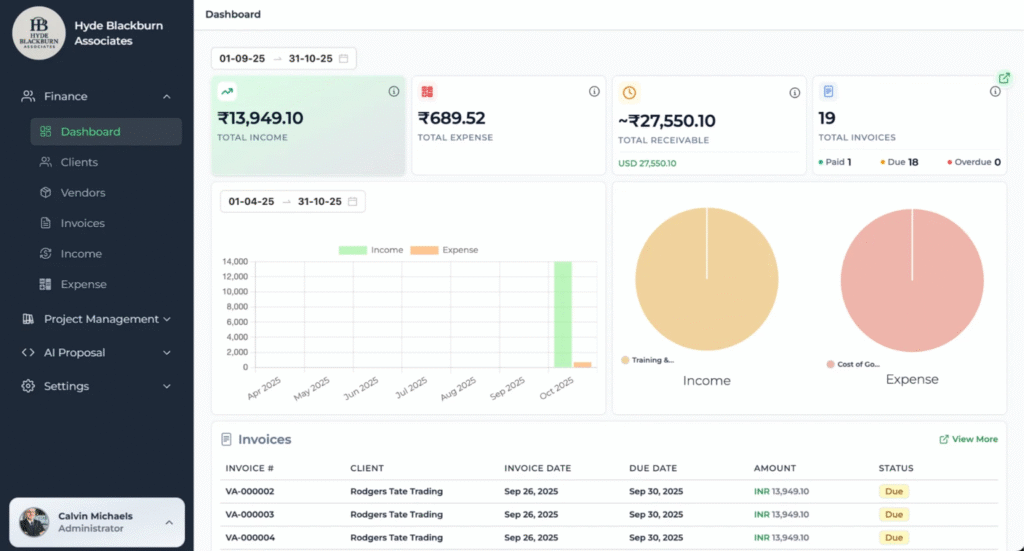
Set a weekly check-in to review your finances. Look at which invoices are paid, which ones are still pending, and which outstanding invoices need attention. This regular habit keeps your business organized. When you Track Client Payments consistently, you quickly catch delays, make faster decisions, and maintain a steady cash flow. Your finances start feeling structured instead of scattered.
Why Late Payments Hurt More Than Finances?
Late payments affect more than your bank balance—they impact your confidence and sense of security. When clients delay, it’s easy to feel undervalued or uncertain. But having a clear system replaces that stress with stability. When you know exactly which payments are due and which ones are complete, you gain mental clarity. You stop overthinking and start managing with confidence.
Why Tymora Is Every Freelancer’s Secret Weapon?
If you’re serious about staying organized and stress-free, Tymora is the simplest way to do it.
Here’s what it does for you:
- Tracks client payments automatically
- Flags overdue and outstanding invoices instantly
- Sends follow-ups on autopilot
- Gives you real-time insights into your earnings
It’s not just software, it’s your financial sidekick.
Because when your payments are handled smoothly, your focus shifts back to what you love: your craft, your clients, your growth.
Final Thoughts
Tracking money doesn’t have to be overwhelming. You don’t need an accountant—you just need a reliable system to Track Client Payments and manage outstanding invoices with confidence. When you stay organized, follow up clearly, and use the right tools, your entire financial flow becomes easier.
Stay consistent. Stay clear. Take control of your payments.
It’s time to manage your cash flow without stress—and systems like Tymora make that journey effortless.
1. How can I track client payment easily?
You can track client payments using a centralized system that records invoices, due dates, and payment status. Automating the process helps avoid missed or delayed payments.
2. What is the best way to track client payment and outstanding invoices?
The best way is to use a dedicated payment tracking tool or app that shows all paid, pending, and overdue invoices in one place — keeping your finances organized.
3. Why is it important to track client payments regularly?
Tracking client payment regularly ensures steady cash flow, prevents overdue invoices, and helps you follow up on unpaid amounts before they affect your business.
4. How do freelancers track client payment efficiently?
Freelancers can track client payment efficiently by using automated invoicing tools that send payment reminders and display all outstanding invoices clearly.
What's inside?
Categories
Customer Success Stories
See how agencies and freelancers are transforming their businesses with Tymora
Tymora has completely transformed how I manage my freelance business. From invoicing to tracking expenses, everything is streamlined and effortless.

Monowar Iqbal Layek
Freelancer
Managing my freelance work is so much easier with Tymora. Invoicing is fast, expense tracking is simple, and I feel more organized than ever.

Sandeep Acharya
Freelancer
Tymora made managing my freelance projects and finances seamless. The platform is intuitive, and support is always responsive and helpful.

Samsur Rahaman
Automation Framework Architect